
A local service website is like a front desk that never sleeps. Calls come in at lunch, quote forms arrive after dinner, and “tap to navigate” clicks happen in parking lots. If your GA4 setup only tracks pageviews, you’re watching the door swing while missing the handshakes.
This guide walks through a practical GA4 setup for 2026: clean installation, lead tracking that matches how service businesses win work, and a few privacy checks that keep your numbers steady. It’s written for owners and marketing directors who need answers they can use.
Start with a simple measurement plan (so GA4 doesn’t turn into noise)
Before you install anything, decide what “success” looks like for your business. Otherwise, GA4 becomes a busy clipboard full of stats you never act on.
For most local service businesses, the goal isn’t “more traffic.” It’s more qualified leads from the right area. That means your tracking should mirror real actions:
- A homeowner taps to call from a service page.
- Someone requests a quote and picks a zip code you serve.
- A visitor clicks your address to open maps.
- A returning customer uses online booking.
Now tie those actions to how you run your marketing, branding, and budget decisions. If you’re investing in Website design updates, you should be able to prove they increased form submits or calls, not just time on site. If you’re paying for website maintenance, you should catch broken forms fast because your tracking will go quiet.
If you want a deeper refresher on GA4’s setup basics and data collection flow, Moz has a solid walkthrough in their GA4 setup guidance.
If an action can lead to revenue, track it like revenue depends on it, because it usually does.
Create the GA4 property and data stream the right way in 2026
In GA4, structure matters. A clean foundation prevents messy reporting later.
First, create a GA4 property for your main business site. Then add a Web data stream for your domain. Name the stream so it’s obvious later, especially if you manage multiple locations or service lines.
Next, handle the settings people often skip:
- Internal traffic filtering: Exclude office visits and vendor traffic.
- Referral exclusions: Add payment processors or scheduling tools that can hijack attribution.
- Cross-domain measurement: Turn this on if you use a separate booking or quote domain.
Also, plan for better audience insight. As of February 2026, GA4’s demographics reporting is easier to use when you enable Google Signals, and it can take a day or two before data appears. That’s useful for local businesses because it helps confirm you’re attracting the right age groups and interests, not just clicks.
If you want another plain-English explanation of the account to property to stream chain, this GA4 account setup guide explains the steps clearly.
Install GA4 through Google Tag Manager, then verify like you mean it
For most service businesses, Google Tag Manager (GTM) is the safest “control panel.” It lets you add tracking without touching site code every time, which helps when your site gets ongoing updates.
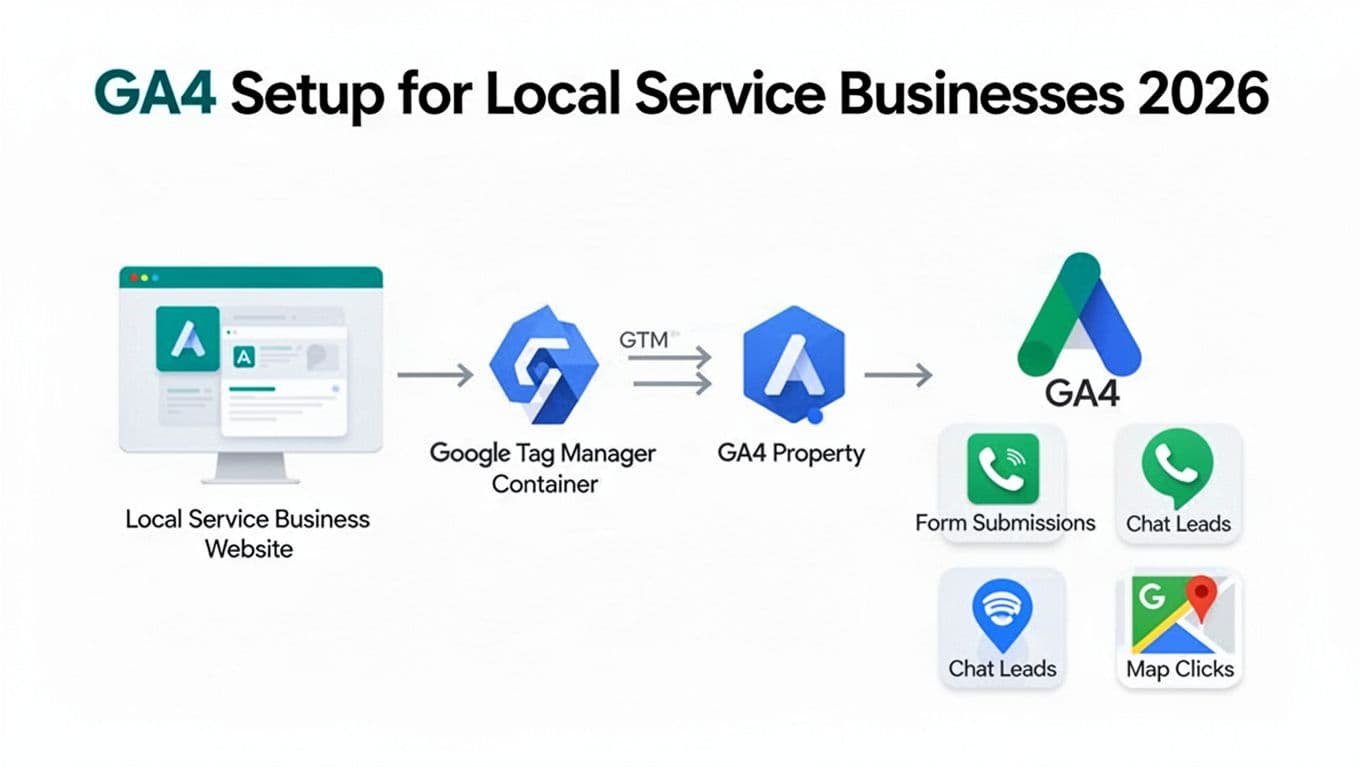
Here’s the step-by-step sequence that avoids most problems:
- Install one GTM container on your site (once).
- Create a GA4 Configuration tag (or GA4 tag setup in GTM) using your Measurement ID.
- Set the trigger to All Pages and publish.
- Use GA4 Realtime and DebugView to confirm events arrive.
- Check for duplicates (a common issue when a plugin and GTM both fire GA4).
- Document what’s installed, including who owns the Google account.
Treat verification as part of quality control. Just like you wouldn’t accept a new phone system without test calls, don’t accept analytics without test events.
Track leads that matter: calls, forms, chats, bookings, and map clicks
Local service websites win business through a handful of actions. Track those actions as events, then mark the most important ones as key events in GA4.
A simple event map like the one below keeps your data readable. Set these up in GTM with click triggers, form submit triggers, and custom events from your chat or booking tool when available.
Here’s a practical starting point for many service companies:
| Lead action you care about | Suggested GA4 event name | Typical trigger source |
|---|---|---|
| Tap-to-call click | click_to_call | Click on tel: links |
| Contact form submit | form_submit | Form success event or thank-you view |
| Quote request submit | quote_request | Form success event |
| Booking completed | booking_submit | Booking confirmation event |
| Chat started | chat_start | Chat widget event (if supported) |
| Directions / map click | map_click | Click on map link or address |
Two quick clarifiers save headaches. First, a click to call is not the same as a completed phone call. If phone leads are your lifeblood, connect your call tracking system so you can tie real calls back to channels. Second, keep event names consistent across campaigns and landing pages, otherwise your reporting splits into fragments.
This is also where local SEO and broader SEO connect to measurement. Ranking gains only matter if they drive leads in your service area. Clean event tracking lets you prove which pages and locations bring in work, then feed that back into content, offers, and branding choices.
For a business-focused take on turning GA4 into outcome reporting (not just traffic charts), this article on configuring GA4 for real business outcomes is worth a read.
Privacy and consent checks (what to do before you trust the numbers)
In 2026, privacy choices affect measurement every day. That doesn’t mean you can’t track leads, it means you need to set expectations and configure consent properly.
Start with the basics:
- Make sure your cookie banner and consent settings match your region and legal needs.
- If you run Google Ads, align consent so attribution doesn’t fall apart.
- Keep a simple internal record of what you collect and why.
Then watch your reports for sudden dips after site changes. A new chat widget, a Website design refresh, or routine website maintenance can break tracking without anyone noticing. The best habit is a monthly “lead tracking test” where someone on your team submits a form, taps the phone number, and confirms those actions show up in GA4.
GA4 also continues to improve cross-channel analysis, which helps local businesses compare search, social, and paid sources side by side. That view is only as good as your tracking and consent signals, so set it up once, then protect it.
Make GA4 a lead counter, not a pageview diary
A solid GA4 setup for a local service business comes down to three things: clean installation, lead-focused events, and regular checks after site updates. When those pieces click, your reports start to sound like your phone ring and your inbox, not a vague traffic story. Treat analytics like part of operations, right alongside marketing, SEO, and your website roadmap. If you want one next step, pick two lead actions today and track them end to end, then build from there with confidence.